TESTING MODE NAVIGATION ONLY
Home
Learn More
Data & Insights
Community
Data Resources
The NLx Research Hub User Guide contains detailed information on the microdata, including best practices and information to help familiarize users with the NLx data.
The most current format, definition, and classification for all data available from the NLx Research Hub.
Instructions for connecting to the Research Hub server to access the Job Table, JobHistory Table, and supplemental job description files.
The most current documentation for the NLx Research Hub API can be found by utilizing the link to the left. Documentation is up to date with the current API release.
Misplaced your API key? Utilize the button to the left to generate a new API key. Note that generating a new key does NOT extend its expiration.
The NLx Research Hub Github page is where all public repositories can be found. When appropriate, user-created repositories may be forked for easy
Have a question about the NLx Research Hub and can’t find the answer on our website? Reach out to us at nlxresearchhub@naswa.org.
Rest APIs
Data from the NLx Research Hub are provided in either CSV or JSON formats through two application programming interfaces (APIs):
Synchronous API: REST API for paging through data 50 records at a time
Asynchronous API: REST API for downloading larger quantities of data from the NLx Research Hub.
API users can retrieve records stored in the NLx jobs database via HTTP requests in the browser (e.g., Firefox or Chrome) or a custom user agent (e.g., Python script). For all access modes, users can apply filters to limit retrieved records.
NLx Research Hub data architecture. Click to enlarge.
For Developers
Sample API Path
https://api.nlxresearchhub.com/v2/jobs/{start}/{end}
Path Parameters
The following tables list all required and optional request parameters for the NLx Research Hub API. All parameter names and values are case sensitive. Note: query results are limited to a maximum of 2 million records to ensure functionalities for all users. Queries exceeding 2 million records will be cancelled. Submitting a request without all required parameters will return an error.
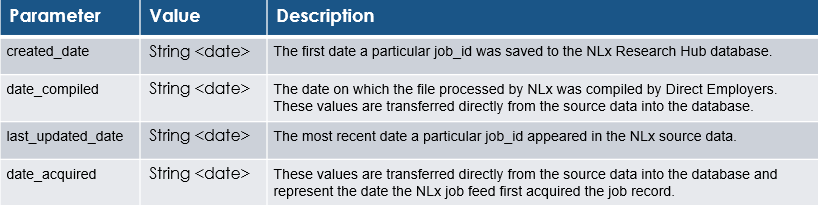
Date Fields
Users MAY specify a primary date column (default created_date) and zero or more auxiliary date column(s) to order results. The primary date column is the column on which start and end filters are applied. Auxiliary date column(s) are applied when primary date columns are identical between records. In all date filters, start MUST be strictly less than end, and the maximum allowed date range spans 35 days. Date ranges exclude end, e.g. (start <= primary date column < end
Meta Properties
Users MAY specify expired which indicates whether a job is still “active” in the NLx source data. job_ids not present in the source data for four consecutive days are considered to be expired. Note that expired does not appear in the source dataset and is applied to the dataset as part of the date pipeline.
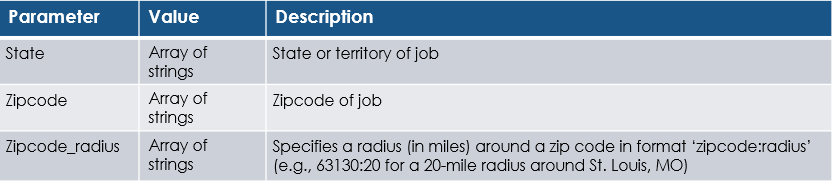
Location Properties
Users MUST specify one or more location properties (i.e., at least one zip code OR at least one state).
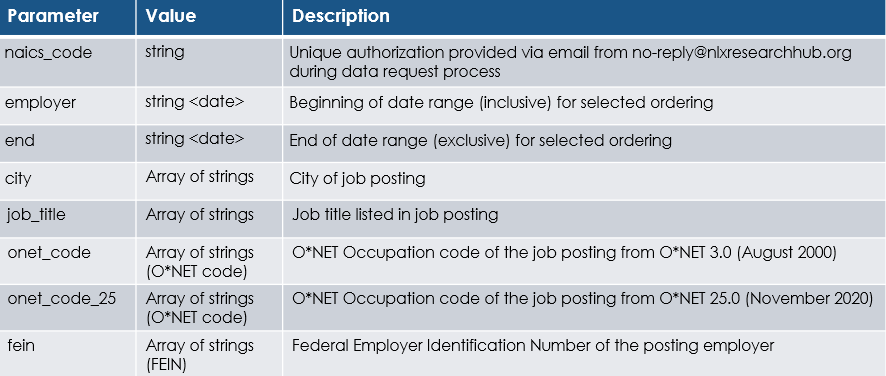
Classification Properties
Users MAY specify zero or more classification properties (i.e., as many or as few as desired). Use of classification property filters may be limited based on approved level of data access.